[Route("/Request", "GET,POST,PUT,DELETE")]
public class Request : IReturn<RequestResponse>
{
    public int Id {get; set; }

    public DateTimeOffset DeliveryDate { get; set; }

    public int ContactId { get; set; }
    public int Count { get; set; }

    public string Notes { get; set; }

    public DateTimeOffset? CreatedOn { get; set; }
}

public class RequestResponse
{
    public List<Request> Requests { get; set; } = new();

    public ResponseStatus ResponseStatus { get; set; }
}
and this:
    public class Request
    {
        [PrimaryKey] [AutoIncrement] public int Id { get; set; }

        [Required]
        public DateTimeOffset DeliveryDate { get; set; }

        [Reference] public Contact Contact { get; set; }

        [Required]
        [References(typeof(Contact))]
        public int ContactId { get; set; }

        [Required]
        public int Count { get; set; }

        [StringLength(2000)] public string Notes { get; set; }

        [Required]
        public DateTimeOffset CreatedOn { get; set; }
    }
and this
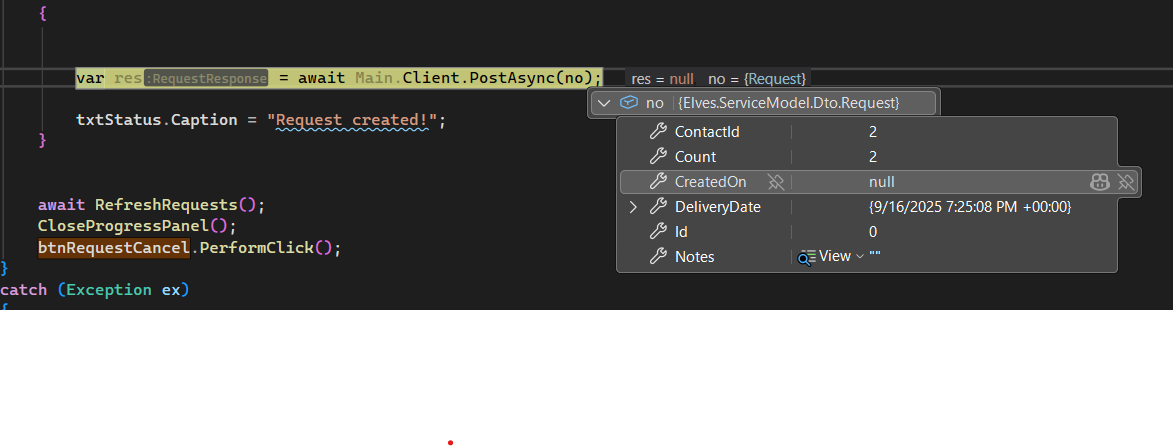
  var no = new Request
  {
     ContactId = (int)leRequestContact.EditValue,
     Notes = txtModelNotes.Text,
     Count = ct,
     DeliveryDate = deRequestDeliveryDate.DateTimeOffset.ToUniversalTime()
  };

  var res = await Main.Client.PostAsync(no);
always result with this error:
Save failed
Error saving Request! Message: Could not deserialize ‘application/json; charset=utf-8’ request using Elves.ServiceModel.Dto.Request’
Error: The JSON value could not be converted to System.DateTimeOffset. Path: $.DeliveryDate | LineNumber: 0 | BytePositionInLine: 48.
Save failed

Error saving Request! Message: Could not deserialize 'application/json; charset=utf-8' request using Elves.ServiceModel.Dto.Request'
Error: The JSON value could not be converted to System.DateTimeOffset. Path: $.DeliveryDate | LineNumber: 0 | BytePositionInLine: 48.
i cant even get to the point where i can see it coming in in the back end, it just explodes in the console. tried it with DateTime as well. i have other projects that use DateTimeoffset a lot. no issues.
I can get the exact command but what should I use for x mix or app mix to get the recommended net 8 or on project that runs kestrel and I can put behind nginx?
I can’t see how to even use the API client. Is there a more fleshed out example than the hello one? Do routes all need to be lower case?
I was using the jsonclient vs the service client and some of my routes kept coming back with not found. Switching back to serviceclient and it all worked again.
I just want to know how to get a skeleton for a rest based set of apis in the most modern, recommended way possible.
You’d start with the project that best matches what you’re trying to build, if you don’t need a Web UI you can use empty web template.
It’s not clear what’s not working? You should just be able to configure your client to use System.Text.Json and then use JsonApiClient as you would a normal ServiceClient, e.g:
ClientConfig.UseSystemJson = UseSystemJson.Always;

var client = new JsonApiClient("https://web.web-templates.io");

var api = await client.ApiAsync(new Hello { Name = "World" });
var ret = await client.GetAsync(new Hello { Name = "World" });
I’d use JsonApiClient directly like this for single user Console or Desktop Apps, but if you’re calling ServiceStack APIs from Web Apps I’d recommend using Dependency Injection for HttpClient instead:
It’s needed when using external clients that uses ServiceStack.Text JSON to call APIs in new ASP .NET Core Templates which use Endpoint Routing and System.Text.Json APIs, you can learn about changes to the ServiceStack templates and improved integration with ASP .NET Core 8 in the release notes starting with ServiceStack v8.1 Release Notes.